
An accessible event lets every attendee reach the venue, move through it, and take part in the full program, not just the parts closest to the entrance. Delivering that takes a checklist that runs from ticket purchase to post-event feedback, anchored in Australian Standard AS 1428.1, WCAG for digital touchpoints, and Auslan provision where the program calls for it. This article gives you the working checklist and the planning steps behind it.
TL;DR:
- Booking a venue with a continuous accessible path of travel that meets AS 1428.1 standards is crucial, as retrofitting can be costly and disruptive.
- Confirm the placement and functionality of interpreters, captioning, and accessible facilities like toilets and quiet rooms well before the event to ensure they are used effectively.
- Digital accessibility requires WCAG-compliant registration forms, alternate formats for materials, and captioned livestreams to serve online and hybrid attendees.
- Collect detailed access requirements during booking and have a designated contact to prevent lost requests and ensure smooth on-the-day support.
- Use accessible ticketing options that clearly communicate available supports and capture attendee needs early, aiding planning and reducing last-minute adjustments.
Table of Contents
- The accessible events checklist at a glance
- How do you plan for accessibility before the event?
- What does an accessible venue actually need?
- Which in-event supports actually get used?
- How do you make an online or hybrid event accessible?
- How do you know the event was actually accessible?
- Publisher perspective: why access is a live-events issue, not a compliance one
- How ticketing platforms support accessible events
- Sources
- FAQ
The accessible events checklist at a glance
Print this, hand it to your production team, and revisit it at every planning meeting from the first booking through to bump out.
- Pre-event: run a co-design consultation, book an accessible venue, and line-item interpreter and captioning costs into the budget early.
- Arrival and journey: confirm drop-off zones, accessible parking counts, and a continuous accessible path of travel (CAPT) from the street to the stage.
- Venue and circulation: check ramp gradients, door widths, accessible toilets, and whether a Changing Places facility is needed.
- On-site services: confirm Auslan interpreters, live captioning, a quiet room, and accessible catering with allergen labelling.
- Digital access: publish an accessible registration form, offer alt-format documents, and caption any livestream.
- Post-event: log incidents, survey access experience, and record what you would change next time.
Every one of those points has a standard behind it. The next sections walk through how to action each stage properly, not just tick it off.
How do you plan for accessibility before the event?
Retrofitting access after a venue is booked is the single most expensive mistake in event production. Co-design fixes that by putting people with lived experience of disability into the planning room before contracts get signed, not after the seating plan is finalised.
Run a short consultation with two or three people who use different access supports, whether that is wheelchair users, Deaf attendees, or people with sensory sensitivities. Ask concrete questions: which entrance do they expect to use, what would stop them booking a ticket, and what has gone wrong at past events they've attended. That conversation shapes your venue shortlist and your budget line items long before opening night.
- Set the budget early. Line-item Auslan interpreters, live captioning, portable accessible toilets, and any extra front-of-house staffing before you lock in ticket pricing.
- Choose accessible booking technology. Your ticketing page needs to meet basic WCAG standards, work with screen readers, and offer a non-digital channel (phone or email) for people who can't complete an online form.
- Provide accessible documents. Offer your event program and terms in Word or HTML format rather than PDF only, since PDFs frequently fail screen readers.
- Add an accessibility field to registration. The NSW government's accessible events toolkit includes a sample registration form you can adapt, asking attendees to flag interpreter needs, mobility requirements, or dietary restrictions at the point of booking.
- Handle the data with care. Store access requests separately from marketing lists and only share them with staff who need to action them on the day.
Pro Tip: Nominate one accessibility contact whose name and mobile number appears on your registration confirmation email. A single point of contact stops access requests getting lost between the ticketing team, the venue, and the production crew.
What does an accessible venue actually need?
A venue can look accessible on a floor plan and still fail on the day if the path from the car park to the mixing desk has a step nobody measured. A continuous accessible path of travel, or CAPT, means every zone an attendee needs, from transport drop-off to the bar to the dance floor, connects without a kerb, stair, or narrow gap breaking the chain. AS 1428.1 sets the working benchmarks: ramp gradients no steeper than 1:14, minimum door clearances around 850mm, and turning circles wide enough for a wheelchair to rotate.
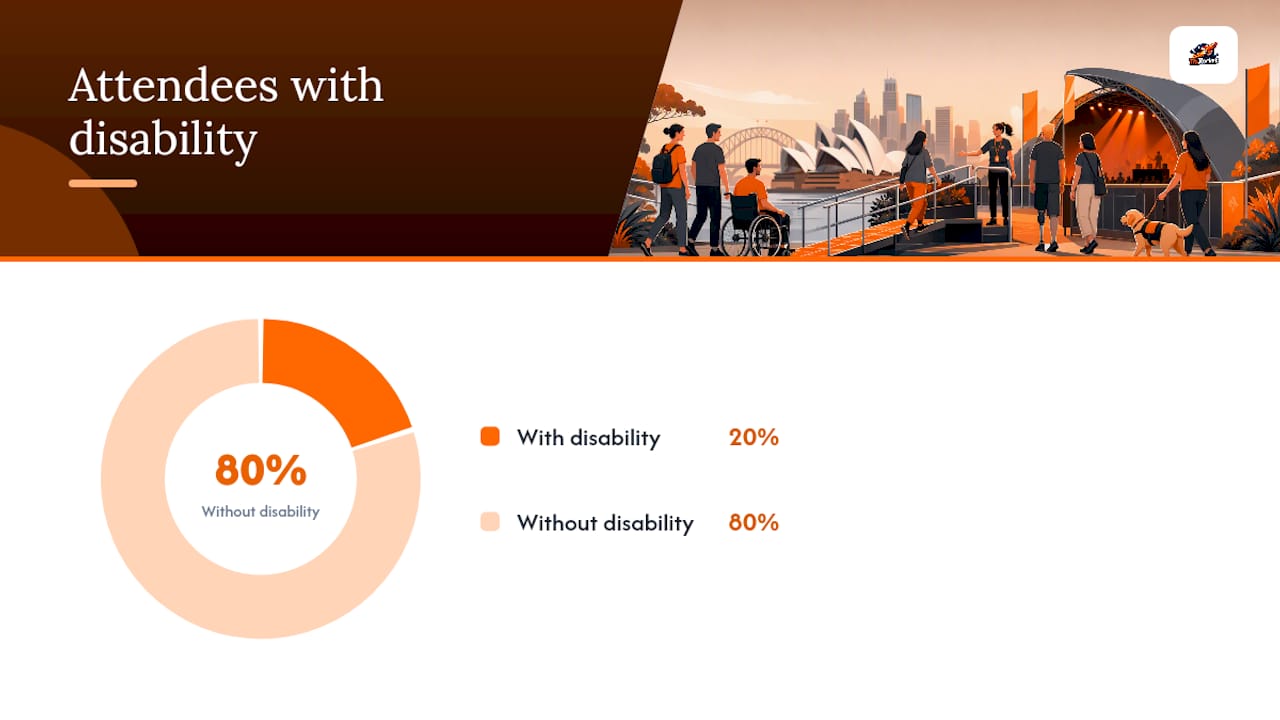
Roughly one in five Australians live with disability, which means a mid-sized club night or festival with a few thousand attendees is very likely to include people who rely on exactly these measurements working in practice, not on paper.
Run these checks on any venue walkthrough:
- Measure door widths at every entry point attendees will actually use, not just the main foyer.
- Test ramp gradients with a level, not a glance. A ramp that "looks fine" can still exceed 1:14.
- Confirm at least one accessible toilet is available and check whether the event scale justifies a Changing Places facility with an adult-sized change table and hoist.
- Disperse accessible seating across the venue rather than clustering it in one corner, and set aside companion seats beside each accessible position.
- Keep sightlines clear to Auslan interpreters and captioning screens from every accessible viewing spot.
- Place signage at consistent heights with high colour contrast, large fonts, and recognised access symbols.
- Publish walking times, gradients, and the nearest accessible transport stop or parking bay well before the event, alongside a couple of photos of the entrance so attendees can plan their arrival.
The Queensland government's Accessible Events Guide and the City of Sydney's inclusive event guidelines both include exact measurements for outdoor and temporary infrastructure, useful if you're running a festival site rather than a fixed venue.
Which in-event supports actually get used?
Booking an Auslan interpreter is only half the job. Where you position them matters just as much: interpreters need clear sightlines from accessible seating, consistent lighting, and enough separation from strobes or smoke effects that Deaf attendees can actually track their signing throughout a set.
Book interpreters and live captioning at least four to six weeks out for anything beyond a small local gig, since qualified Auslan interpreters are in short supply on weekend nights. Test any hearing loop or induction system on-site before doors open. A loop that hasn't been checked since the last event is a common failure point.
- Confirm interpreter and captioning bookings with a written brief covering the run of show, not just the start time.
- Set up a quiet or sensory room away from speakers and strobes, and advertise its location on signage and the event page.
- Brief every staff member and contractor on accessible routes, assistance animal protocols, and evacuation procedures for attendees who can't use stairs, based on a simple briefing map rather than a verbal rundown.
- Offer a short meet-and-greet or guided walkthrough before doors open for attendees who've flagged sensory or navigation needs.
Pro Tip: A ten-minute pre-doors walkthrough for attendees who request it, showing them the quiet room, the nearest accessible toilet, and the interpreter position, is one of the cheapest fixes available and measurably reduces on-the-day confusion.
How do you make an online or hybrid event accessible?
Digital access deserves the same rigour as the physical venue. Run these checks before any online or hybrid event goes live.
- Test your event page and registration form against basic WCAG practices, including keyboard navigation and screen-reader compatibility.
- Provide alternate formats of any downloadable material, such as Word or HTML copies alongside PDFs.
- Book live captioning for the stream and prepare audio description for any pre-recorded visual segments.
- Confirm your platform supports interpreter video integration without cropping their frame.
- Publish a short social script, a few photos and a plain description of what attendees can expect, so people know the format before they log in.
How do you know the event was actually accessible?
A short post-event survey tells you more than any pre-event checklist ever will. Ask specifically about ease of booking, physical access, and staff responsiveness, not just overall satisfaction.
- Include three or four targeted questions: could you book easily, could you move around the venue, did staff know how to help?
- Debrief with the venue and your accessibility contact within a week, while details are fresh.
- Track hard numbers: access requests received, interpreter bookings, incidents logged, and satisfaction scores.
- Publish a short accessible summary of what changed for next time. It shows attendees you listened.
Publisher perspective: why access is a live-events issue, not a compliance one
Access shapes whether someone buys a ticket at all. A guided meet-and-greet for a Bollywood night or a club show costs almost nothing and turns a nervous first-timer into a repeat attendee. Ticketing data on access needs, captured at booking, is one of the most useful tools an organiser has.
— GARY
How ticketing platforms support accessible events
Publishing accessibility information shouldn't be an afterthought buried in a footer. It belongs on the event page itself, next to the lineup and the door times, the same way MCEC recommends listing quiet rooms, assistance animal policies, and captioning availability upfront rather than waiting for attendees to ask.
A ticketing platform can give promoters and venues a way to capture access requirements at the point of purchase, so interpreter bookings, companion seating, and dietary needs land with your team before doors open rather than in a scramble on the night. For organisers publishing event listings, structuring accessibility details clearly on the page, similar to how event archives display accessible listing information, helps attendees plan with confidence before they book. If you're running a nightclub party, DJ night, or Bollywood concert and want ticket sales and access data working from the same dashboard, set up your event on Tixrocket and add your accessibility details to the listing today.
Sources
- Toolkit for accessible and inclusive events (NSW government)
- Inclusive and accessible event guidelines (City of Sydney, Aug 2023)
- Accessibility checklist for your event (MCEC)
FAQ
What Should Be On An Accessible Events Checklist?
It should cover pre-event co-design and budgeting, accessible registration, venue CAPT and toilets, in-event supports like Auslan and captioning, digital access for online components, and post-event feedback collection.
What Is A Continuous Accessible Path Of Travel?
A CAPT is an unbroken route, free of steps or narrow gaps, connecting transport drop-off, entry, and every zone attendees need to use, measured against standards like AS 1428.1.
Do I Need Auslan Interpreters At Every Event?
Not every event, but any program with spoken content, live music with lyrics, or public announcements should offer Auslan interpreting or captioning if Deaf attendees are expected or have requested it at registration.
How Can Ticketing Help With Accessibility?
A ticketing platform that captures access needs at booking, such as interpreter requests or companion seating, lets organisers plan staffing and layout in advance rather than reacting on the day; Tixrocket supports this at the point of purchase.
What's A Changing Places Facility?
It's a purpose-built accessible toilet with an adult-sized change table and hoist, recommended for larger events where standard accessible toilets aren't sufficient for attendees with high support needs.
Disclaimer: Event dates, times, venues, ticket prices, availability and entry requirements may change. Please check the official TixRocket event page before purchasing or attending. Venue conditions, age restrictions and valid photo ID requirements may apply.